
Android Ringtone Songs
Ringtone Phone AppPersonalization
4.73.18K Reviews
- Version
- 2.3.1
- Installs
- 10.00M
- Age Rating
- Teen
Screenshots

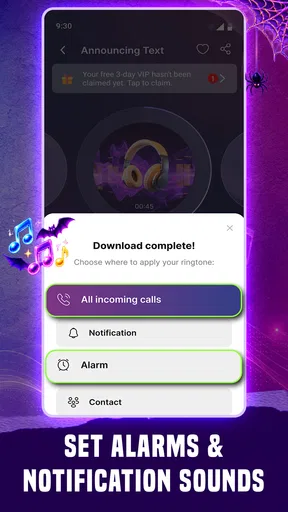
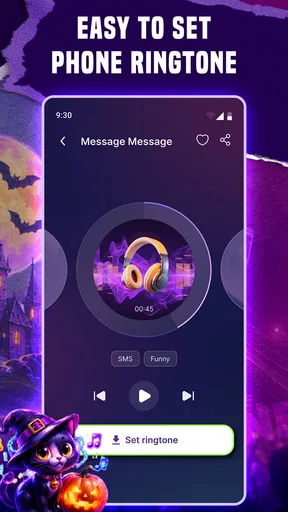
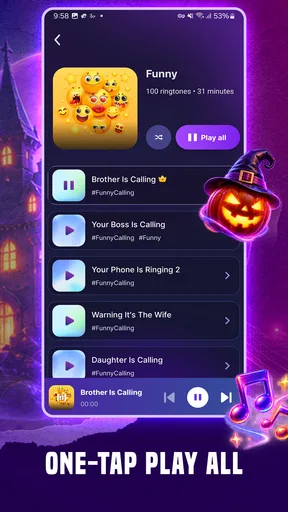
Our Review of Android Ringtone Songs
 Analysis by Appyee
If you're anything like me, you might find yourself getting bored with the same old ringtone on your phone. Enter Android Ringtone Songs, an app that promises to spice up your phone's sound experience with a plethora of tunes. I decided to give it a whirl, and here's the scoop on what I discovered.
Why the first week feels appealing
The immediate pleasure of a ringtone app is simple: one small change makes a familiar phone feel more personal. I can see the appeal of browsing for a sound that suits a favorite contact, or replacing a default tone that has become easy to ignore. Android Ringtone Songs is a free personalization app from Ringtone Phone App, and its focus is specific: choosing sounds for an Android phone rather than changing the look of the whole device.
Its average rating is 4.7 from around 199,000 ratings, and it has over 5 million installs. Those figures suggest that ringtone customization is a common use case, though they do not tell me whether every sound will match an individual listener’s taste. The app is rated Teen, runs on Android 7.0 or later, and its current version is 2.0.2. That makes checking device compatibility a sensible first step before spending time browsing.
A practical way to start is to choose one sound for a real purpose instead of changing every alert at once. For example, I might try a distinctive ringtone for calls and keep message alerts familiar. That makes it easier to judge whether the new sound is noticeable in daily life without turning every notification into a distraction. If I stop noticing it after a few days, that is useful feedback rather than a reason to keep searching endlessly.
Exploring the Variety
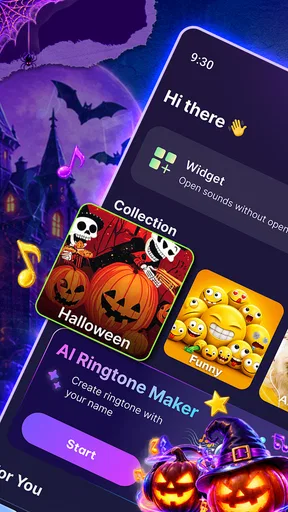
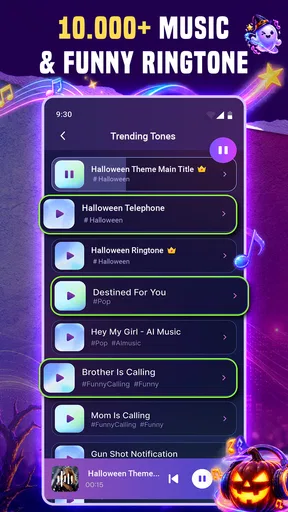
Right off the bat, Android Ringtone Songs offers an impressive variety of tunes. Whether you're into the latest chart-toppers, classic hits, or even some quirky sound effects, this app has got you covered. I was pleasantly surprised to find a mix of genres that cater to just about every musical taste. From pop to rock, and even some ambient sounds for those chill moments, the selection is pretty vast.
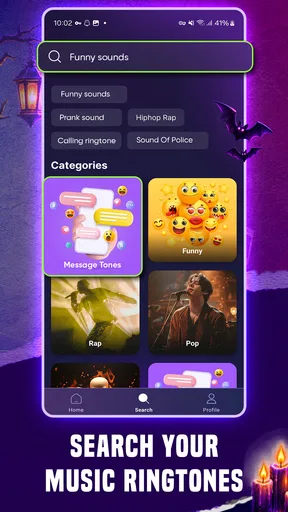
The app's interface is straightforward and user-friendly. Navigation is a breeze, with categories neatly organized for easy browsing. I particularly liked the "Trending" section, which showcases the most popular ringtones at any given time. It's a neat way to keep your phone's sound current without much effort.
How to make the choice useful beyond novelty
A large catalogue is most valuable when I use it with a purpose. Instead of previewing dozens of similar clips, I would narrow the search to a mood or a practical need: a clear, attention-grabbing call tone for a noisy commute, or a softer sound for a quieter home. Trending picks can help when I have no starting point, but popularity is not the same as suitability. A sound that stands out in a preview may become tiring if it plays repeatedly throughout the day.
One useful test is to listen at a moderate volume and imagine hearing the clip in the place where calls usually arrive. A tone that sounds pleasant through a phone speaker at close range may feel too sharp across a room. I would also avoid choosing a favorite song’s most recognizable section without considering repetition; a short musical hook can be charming once and irritating after many calls. The best pick is often the one I can identify quickly but do not mind hearing again.
Customization Features
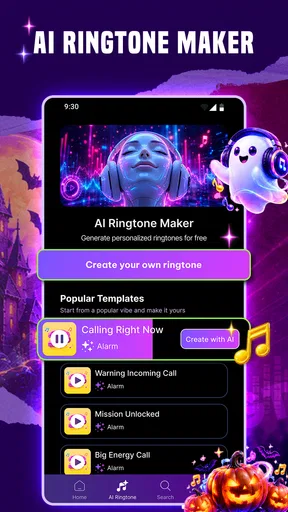
One of the standout features of the app is its customization options. Not only can you choose from the existing library, but you can also edit ringtones to suit your preferences. I found the editing tool intuitive enough for basic tweaks, like trimming the length of a ringtone or adjusting the volume. It's perfect for those who like their ringtones just so.
For those feeling a bit more creative, the app allows you to create ringtones from your own music library. I tried this with a few of my favorite tracks, and it was surprisingly simple. Just select a song, pick the section you want, and voila—your personalized ringtone is ready.
Everyday setup and small trade-offs
Creating a custom clip can be more satisfying than settling for a ready-made sound, especially when I want a particular musical moment rather than a whole track. I would listen to the beginning and end of the selected section before saving it: a cut that starts abruptly or ends mid-note can sound awkward when it repeats. Keeping the chosen excerpt recognizable but brief is a practical balance between personal taste and a ringtone that does its job.
For a realistic daily example, imagine I am expecting an important call while working at home. I could choose a tone that is easy to distinguish from other household sounds, then keep routine notifications unchanged so I do not confuse every ping with that call. On a busy day, this kind of selective setup is more useful than constantly switching themes. If I want a sound that belongs to a specific person, I should check the phone’s own contact and ringtone settings after selecting a clip; the app’s role is to provide or shape audio, while the phone controls how that sound is assigned.
There is a trade-off in using personal music, too. A track I already love may make a satisfying ringtone, but hearing the same fragment repeatedly can wear out its appeal. I would rather reserve a favorite song for a contact I hear from occasionally and use a less precious sound for frequent calls. That simple separation helps keep music enjoyable instead of turning it into background interruption.
Sound Quality
Sound quality can often be a hit or miss with ringtone apps, but I'm happy to report that Android Ringtone Songs delivers crisp and clear audio. I tested several ringtones at different volumes, and they all maintained excellent quality without distortion. It's a relief not to have to compromise on sound just to personalize my phone.
Keeping the app useful month to month
The recurring value here depends less on constantly discovering new clips and more on whether the sounds I choose remain useful. A ringtone is not something I need to refresh every week. Once I have a call sound I can recognize and a custom clip that feels right, the app may move into occasional-use territory: I might return when my preferences change, when a tone becomes stale, or when I want to make a different sound from music I already have.
That makes this a lighter commitment than apps built around daily browsing. If I enjoy changing small details on my phone, the library gives me room to experiment without requiring a regular routine. If I only want one dependable ringtone and rarely think about personalization, I may get what I need quickly and then have little reason to open the app again. That is not necessarily a flaw; the value is in finding a tone that works, not in spending time inside the app.
Compared with the usual alternatives, the built-in Android sound picker is the simpler choice when its included tones are enough. It avoids installing a separate catalogue, while this app is more appealing when I want to browse a wider selection or shape a sound to my preference. Using an audio editor and then setting a file through the phone can offer more control, but it also adds steps. I would choose the least complicated route that gets me a tone I genuinely want to hear.
Maintenance and sources of fatigue
For a ringtone tool, maintenance should be modest: choose a sound, make sure it behaves as expected on the phone, and revisit it only when needed. I would preview the final clip and check that the chosen sound is still assigned after changing it, rather than assuming that editing alone has made it the active ringtone. If I use the app infrequently, I can also avoid treating every new discovery as a reason to redo a setup that already works.
The main source of fatigue is likely to be repetition. A loud, catchy clip can be memorable at first and grating later, while a very subtle one can disappear in a noisy setting. There is also the browsing trap: a large choice can turn a quick task into a long search, especially if I keep comparing similar sounds instead of testing a shortlist. I would save time by deciding in advance whether I need a call tone, a message sound, or a custom excerpt, then stopping once I find an option that meets that need.
Ads are another point to weigh. The app is free, but in-app purchases range from $1.49 to $59.99 per item, so I would look carefully at any purchase prompt and decide whether a particular extra is worth it to me. The free selection may be enough for someone who wants a basic change, while someone who dislikes ads or wants paid content may prefer to consider the purchase options before committing time to browsing. I would not pay simply because a premium sound is presented as exclusive; I would pay only if it solves a specific need or feels meaningfully better to my ears.
Sound Quality
Sound quality can often be a hit or miss with ringtone apps, but I'm happy to report that Android Ringtone Songs delivers crisp and clear audio. I tested several ringtones at different volumes, and they all maintained excellent quality without distortion. It's a relief not to have to compromise on sound just to personalize my phone.
Ads and In-App Purchases
As with many free apps, there are ads to contend with. While not overly intrusive, they do pop up occasionally. If ads aren’t your thing, the app offers a premium version that removes them and unlocks additional ringtones. Personally, I found the free version sufficient for my needs, but it's good to have the option for those who want more.
In-app purchases are also available for exclusive content. I explored some of the premium ringtones, and they are indeed unique. However, the free selection is robust enough that you might not feel the need to splurge.
Who should choose it—and who should skip it
I would recommend giving it a try if choosing a ringtone is part of how you make a phone feel like yours, or if you want to browse beyond the tones already on the device. It is also a reasonable fit for someone who wants to edit a short excerpt from personal music rather than use a full track. The app’s 2.4 thousand reviews add another signal of active user feedback, but the useful question is still whether its sound choices and workflow suit your own habits.
I would skip it if I am already happy with the built-in tones, rarely receive calls, or prefer a completely quiet phone. It is also not the best route if I need a highly technical audio workstation; its appeal is straightforward ringtone selection and basic customization, not a complicated production process. Anyone using an older Android device should confirm that it meets the Android 7.0 minimum before installing.
One question people often have is whether they need to buy something to get started. The app is free to install, while optional in-app purchases are available; I would begin with the free experience and only consider a purchase if I have found a clear reason. Another practical question is whether a selected tone will suit every setting. That depends on the clip and listening environment, so I would test it at the volume and distance where I normally notice calls rather than relying only on a preview.
If I decide to make a ringtone from my own music, I would check that the track is available in the phone’s library and listen to the chosen segment before using it. I would also keep expectations focused: a custom excerpt can personalize a call, but it does not replace the phone’s broader sound settings. For users who want extensive control over notification behavior, the Android settings remain important even when a separate app provides the audio.
Final Thoughts
All in all, Android Ringtone Songs is a solid choice for anyone looking to refresh their phone's soundscape. With its extensive library and user-friendly features, it's a fun way to add a little personal flair to your device. If you're tired of the same old tones, give this app a try—it might just be the upgrade your phone needs.
Ready to explore a world of sound? Check out the app on your Android device and let your phone's personality shine.
My long-term verdict is that this app earns space when I use it as a tool, not as a habit I have to maintain. I would browse, choose a ringtone that works in real life, and return only when I want a different sound. That makes its lasting value personal: it is worthwhile for someone who enjoys occasional audio customization, but unnecessary for someone who already has a tone they like. The best result is not a phone that changes every week; it is one that sounds a little more like me without demanding constant attention.
Privacy and Permissions
See what permissions an app requests and how it handles your data.
- Contacts
- read your contacts, modify your contacts
- Photos/Media/Files
- read the contents of your USB storage, modify or delete the contents of your USB storage
- Storage
- read the contents of your USB storage, modify or delete the contents of your USB storage
- Wi-Fi connection information
- view Wi-Fi connections
- Other
- view network connections, change system display settings, full network access, change your audio settings, run at startup, control vibration, prevent device from sleeping, modify system settings, Google Play license check
Verdict
Strengths of Android Ringtone Songs
- Wide variety of tones available.
- Easy to navigate user interface.
- Daily updates with new ringtones.
- High-quality audio options.
- Customizable notifications and alarms.
Limitations of Android Ringtone Songs
- Contains frequent ads.
- Limited free options available.
- Requires internet for some features.
- Occasional app crashes reported.
- In-app purchases can be pricey.
Similar Picks in This Category
View All
Microsoft SwiftKey AI Keyboard
SwiftKey4.3

Wallpapers
Google LLC4.1

Zedge™ Wallpapers & Ringtones
Zedge4.7

Yandex Browser with Alice AI
Direct Cursus Computer Systems Trading LLC4.3

Ringtone Maker:create ringtone
Big Bang Inc.4.7

Fonts Keyboard
Fonts Keyboard3.9
Frequently Asked Questions
What is Android Ringtone Songs and what features does it offer?
Android Ringtone Songs is an app designed to provide users with a wide variety of ringtones for their Android devices. It offers features such as customizable ringtone options, high-quality sound files, and a user-friendly interface that allows you to easily browse, preview, and set your favorite tunes as your ringtone, notification, or alarm sound.
Is Android Ringtone Songs free to use, and are there any in-app purchases?
The app is free to download and use, offering a wide selection of ringtones at no cost. However, it may include in-app purchases for premium content or an ad-free experience. These purchases are entirely optional and are designed to enhance your user experience.
How can I set a ringtone from the app on my Android device?
Setting a ringtone from the app is simple. First, browse through the available ringtones and preview them. Once you find one you like, select the option to set it as your ringtone, notification, or alarm. The app will guide you through the necessary steps to apply the sound to your device settings.
Are the ringtones in Android Ringtone Songs copyright-free?
The app offers a mix of copyright-free and licensed content. It is important to check the licensing information provided within the app for specific ringtones to ensure compliance with copyright laws. The app itself ensures that all available ringtones are legally sourced and properly licensed for user enjoyment.
What should I do if I encounter issues with the app?
If you experience any issues with Android Ringtone Songs, you should first check for updates to ensure you have the latest version. If problems persist, you can reach out to the app’s support team through the contact information provided within the app or on the official website. They are available to assist with troubleshooting and resolving any concerns.
